
Mastering your kitchen workflow requires a delicate balance between meticulous planning and effortless execution, often leaving home cooks torn between the high-tech convenience of mobile apps and the granular control of custom spreadsheets. While mobile apps excel at on-the-go convenience, offering features like barcode scanning and automated grocery list synchronization, spreadsheet-based systems provide an unparalleled level of data depth and flexibility for those who want to track macro-trends, inventory costs, and recipe iterations without the constraints of a pre-defined user interface. Ultimately, the "best" system hinges on whether you value the speed of a streamlined, "set-it-and-forget-it" mobile experience or the infinite scalability of a bespoke digital ledger designed to evolve alongside your culinary skills and nutritional goals.
| Feature | Spreadsheet Tracking | Mobile App Tracking |
|---|---|---|
| Customization | Infinite; build your own formulas, macros, and visual dashboards. | Limited to developer UI/UX; restricted categorization options. |
| Data Input | Manual entry; slower but allows for precise, multi-metric data. | Fast; utilizes barcode scanning, voice commands, and API lookups. |
| Automation | Low; requires manual updates for inventory and list generation. | High; automated shopping lists and real-time nutritional syncing. |
| Long-term Analysis | Excellent; easy to export and visualize year-over-year trends. | Moderate; data is often "trapped" within a proprietary ecosystem. |
| Accessibility | Best on Desktop; can be clunky on small mobile screens. | Optimized for mobile; perfect for use while grocery shopping. |
| Cost Structure | Free (Google Sheets/Excel); no recurring subscription fees. | Freemium; most "pro" features locked behind monthly subs ($5-$15). |
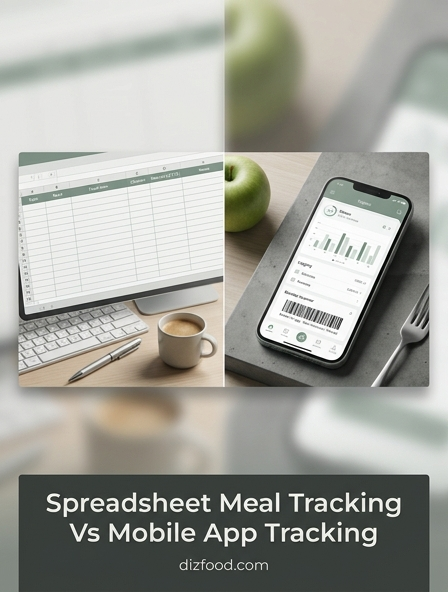
Spreadsheet Flexibility vs Mobile App Automation
The choice between using a spreadsheet and a mobile app for kitchen management often comes down to the struggle between total control and effortless speed. Spreadsheets, such as Google Sheets or Microsoft Excel, offer an infinite canvas where the user defines the logic. You can create specific columns for "Pantry Location," "Gram Weight," or even "Cost Per Serving" without being restricted by a developer's rigid interface. This flexibility allows for complex meal planning that accounts for leftovers, bulk ingredient usage across multiple recipes, and specialized dietary calculations that standard apps might not support.
In contrast, mobile apps prioritize automation to reduce the friction of data entry. Using sophisticated algorithms, these apps can predict what you are eating based on your history or the time of day. While a spreadsheet requires you to build your own formulas to see your weekly caloric intake, an app provides these insights instantly. The automation extends to the kitchen environment through features like recipe importing, where a URL is converted into a structured ingredient list. However, this convenience often comes at the cost of "feature creep," where the user is forced into a workflow that may not match how they actually cook or organize their cabinets.
- Spreadsheet Strength: Unlimited customization of data fields and complex formula creation.
- App Strength: High-speed entry through predictive text and automated recipe scrapers.
- Spreadsheet Weakness: High initial setup time and manual maintenance requirements.
- App Weakness: Rigid structures that cannot easily accommodate unique kitchen workflows.
Data Privacy and Ownership Comparison
When tracking every meal consumed in your kitchen, you are generating a massive amount of personal biometric and behavioral data. Spreadsheets provide a high level of data sovereignty. If you keep an Excel file on a local hard drive or a private cloud account, you own that data entirely. There is no third-party company analyzing your eating habits to serve you targeted advertisements for supplements or weight-loss programs. For the privacy-conscious cook, the spreadsheet is a "closed loop" system where your nutritional history remains your own business.
Mobile apps, particularly free versions, often rely on data monetization to sustain their business models. By using these platforms, you frequently agree to terms of service that allow the company to aggregate your data or share it with marketing partners. Furthermore, there is the risk of "platform rot." If a mobile app company goes bankrupt or decides to sunset an older version of their software, years of your meal history could vanish overnight. A spreadsheet file, conversely, is a universal format that can be opened decades from now, ensuring that your long-term health records remain accessible and under your direct control.
| Feature | Spreadsheet Tracking | Mobile App Tracking |
|---|---|---|
| Data Ownership | User-owned (Local/Private Cloud) | Company-owned (Server-side) |
| Monetization | None (Private) | Targeted ads and data insights |
| Longevity | Highly durable file formats | Dependent on app updates/service |
| Access Control | Password protected / Offline | Login required / Cloud dependent |
Manual Nutrient Entry vs Barcode Scanning
The tactile experience of logging food in the kitchen differs significantly between these two methods. Spreadsheet tracking usually necessitates manual entry, which, while slower, encourages a higher level of nutritional literacy. When you have to manually type in the protein, fat, and carbohydrate content of a specific brand of Greek yogurt, you become more intimately aware of what you are consuming. This "manual friction" acts as a speed bump that forces intentionality, potentially preventing mindless snacking since the effort to log it is higher than the reward of the food.
Mobile apps revolutionize the kitchen workflow with barcode scanning. By using a smartphone camera, a user can instantly pull data for millions of products. This is undeniably more efficient during a busy meal-prep session where scanning five ingredients takes seconds, compared to the minutes required to look up and type data into a sheet. However, app databases are notoriously prone to user-generated errors. It is common to scan a barcode and find that the crowdsourced data is missing fiber content or has incorrect calorie counts. The spreadsheet user relies on verified labels, whereas the app user relies on a massive, sometimes messy, digital library.
- Locate the barcode on the food packaging.
- Open the app's camera interface to scan.
- Verify the portion size matches your serving.
- Submit to add the macros to your daily total instantly.
The Cost of Tracking: Free Sheets vs Subscriptions
Financial sustainability is a major factor in long-term health tracking. Spreadsheets are virtually free. If you use Google Sheets, there is no cost involved beyond an internet connection. Even Microsoft Excel is often a one-time purchase or part of a suite many already own for work. There are no "premium" tiers hidden behind a paywall; you have access to every feature, graph, and formula from day one. For a household on a budget, managing the kitchen through a spreadsheet ensures that health tracking does not become another monthly liability.
Modern mobile apps have increasingly moved toward a "freemium" model. While the basic version allows for simple calorie counting, essential features like macro-nutrient goals, meal timing, and data exporting are often locked behind expensive monthly or yearly subscriptions. These costs can range from $10 to $20 per month, which adds up to a significant investment over several years. While the subscription pays for database maintenance and feature updates, many users find it frustrating to pay for the right to view their own data in a specific chart format. The choice often comes down to whether the time saved by the app's automation is worth the recurring financial cost.
- Spreadsheets: Zero recurring costs, no ads, and full feature access.
- Mobile Apps: Frequent subscription fees for "Pro" features like macro-tracking.
- Hidden Costs: Apps may use more battery and data; spreadsheets require manual time investment.
Customizing Your Dashboard for Personal Goals
Visualization is key to understanding kitchen habits, and spreadsheets excel at bespoke dashboard creation. A user can create a Pivot Table that shows their average protein intake specifically on days they go to the gym, or a chart that compares grocery spending to caloric density. Because you are the architect, you can prioritize the metrics that matter to you. If you are tracking sodium for heart health or fiber for digestion, you can put those front and center, rather than being forced to look at whatever the app's default dashboard prioritizes.
Mobile apps offer polished, aesthetic dashboards that are designed by professional UI/UX experts. They are visually appealing and easy to read at a glance, often using "rings" or "heat maps" to show progress. While beautiful, these dashboards are often "black boxes" where you cannot change how the data is aggregated. You might want to see a three-week rolling average of your sugar intake, but if the app only offers a weekly view, you are out of luck. The spreadsheet user trades visual polish for analytical depth, allowing for a kitchen management system that evolves alongside their specific health journey.
| Dashboard Element | Spreadsheet Customization | Mobile App Customization |
|---|---|---|
| Chart Types | Unlimited (Bar, Line, Scatter, etc.) | Pre-selected by developers |
| Goal Setting | Dynamic, formula-based goals | Static, usually input-based |
| Multi-Metric View | Cross-reference any two data points | Limited to app-supported pairs |
| Visual Style | Utilitarian/Raw Data | High-fidelity/Gamified |
Offline Accessibility and Data Reliability
In the middle of a busy kitchen, your internet connection might be spotty, or you might be cooking in a remote location like a cabin. Spreadsheets saved locally on a device do not require a signal to function. You can log your ingredients, check your recipe ratios, and update your inventory without waiting for a server to respond. This reliability is a cornerstone for those who treat their kitchen tracking as a critical daily task. There is no "Server Down" message preventing you from knowing if you have enough flour left for a loaf of bread.
Mobile apps are heavily reliant on cloud synchronization. While many apps have an offline mode, it is often limited. You may be able to log a food item, but you might not be able to search the global database or sync your data across devices until you are back online. Furthermore, mobile apps are prone to glitches, crashes, and update bugs that can temporarily lock you out of your data. For someone who needs to log meals accurately for medical reasons, such as managing diabetes, the potential unreliability of a cloud-based app can be a significant drawback compared to the stable, unchanging environment of a local spreadsheet.
- Local Storage: Files are accessible 24/7 regardless of ISP stability.
- Cloud Syncing: Apps allow multi-device access but require active connections.
- Reliability: Spreadsheets don't "crash" due to server-side updates.
- Speed: Local files often open faster than heavy, ad-laden mobile applications.
User Interface vs Spreadsheet Functional Control
The user interface (UI) of a mobile app is designed for "thumb-friendly" interaction. In a kitchen setting, where your hands might be wet or messy, tapping large icons and using voice commands to log food is a major advantage. These apps are built for mobile hardware, utilizing haptic feedback and intuitive gestures that make the tracking process feel like a game. The "gamification" of meal tracking-earning badges or seeing streaks-can be a powerful motivator for users who struggle to stay consistent with their dietary goals.
Spreadsheets offer a "functional control" interface that is decidedly not thumb-friendly. Attempting to edit a small cell in Google Sheets on a smartphone while standing at a kitchen counter can be an exercise in frustration. Spreadsheets are fundamentally designed for a keyboard and mouse. However, this interface allows for bulk editing that apps cannot match. If you realize you have been miscalculating the calories in your morning coffee for the last month, you can fix all thirty entries in a spreadsheet with a single "find and replace" or a formula drag. In an app, you would likely have to go back and edit every single day individually, a tedious task that most users would simply abandon.
- App UI: Optimized for quick, single-point entries and tactile feedback.
- Spreadsheet UI: Optimized for bulk data management and complex filtering.
- Accessibility: Apps win on mobile; spreadsheets win on desktop/laptop.
Integrating Wearable Tech with Modern Apps
The modern kitchen is increasingly connected to our bodies through wearable technology. Mobile apps have a distinct advantage here because they are built to talk to other apps. Through APIs, a meal tracking app can automatically pull "calories burned" data from an Apple Watch or a Garmin device. It can then adjust your remaining calorie budget for the day in real-time. If you spent the afternoon gardening or deep-cleaning the kitchen, the app knows you need more fuel and adjusts your macros accordingly without you lifting a finger.
Spreadsheets are largely isolated from the wearable ecosystem. To get your activity data into a spreadsheet, you usually have to export a CSV file from your fitness tracker and manually import it, or type the numbers in yourself. While some advanced users utilize tools like Zapier or IFTTT to bridge this gap, it requires technical knowledge that the average cook does not possess. For those who want their kitchen habits to be a seamless part of their broader physiological data, mobile apps provide a level of integration that spreadsheets simply cannot compete with in an automated fashion.
- Connect your fitness wearable to your smartphone via Bluetooth.
- Grant permission for the meal app to read "Active Energy" data.
- Cook and eat while the app automatically balances intake against expenditure.
- Review the combined report at the end of the day.
Long Term Diet Sustainability and Habit Tracking
Sustainability in diet tracking is about reducing "user fatigue." Mobile apps are excellent at getting people started. Their low barrier to entry and shiny interfaces make the first few weeks of tracking feel exciting. However, many users find that the constant notifications and the "judgmental" red numbers when they go over a limit lead to burnout. The app can become a source of anxiety rather than a tool for health. Over time, the very features meant to help-like constant reminders-can become annoying, leading the user to delete the app entirely.
Spreadsheets, being neutral tools, don't nag. They offer a more "journalistic" approach to tracking. The act of sitting down at a computer to log the day's meals can become a meditative evening ritual rather than a frantic interrupted task throughout the day. This intentionality often leads to better long-term habit formation. Because the user had to build the system, they have a "sunk cost" investment in it, making them more likely to stick with it through plateaus. It feels less like a corporate overseer and more like a personal diary of their kitchen successes and failures.
- App Habit Loop: Relies on external triggers like push notifications and streaks.
- Spreadsheet Habit Loop: Relies on internal discipline and the ritual of data entry.
- Burnout Risk: High in apps due to notification fatigue; lower in sheets due to passive nature.
Final Verdict: Choosing Your Optimal Tracking Method
The decision between a spreadsheet and a mobile app depends entirely on your personality type and your specific kitchen goals. If you are a "data architect" who loves analyzing trends, creating custom metrics, and values privacy above all else, the spreadsheet is your ultimate tool. It rewards the time you put into it with unparalleled insights and total ownership of your journey. It is a slow-burn tool for those who view nutrition as a long-term engineering project rather than a daily chore.
On the other hand, if you are a "busy optimizer" who needs to log meals in under thirty seconds so you can get back to your family or work, the mobile app is the clear winner. The speed of barcode scanning and the convenience of wearable integration outweigh the downsides of subscriptions and data privacy concerns for most people. The "best" system is ultimately the one you will actually use. Many find a hybrid approach works best: using an app for quick daily logging and exporting that data to a master spreadsheet for deep monthly analysis.
| User Profile | Recommended Method | Primary Reason |
|---|---|---|
| The Data Scientist | Spreadsheet | Full control over formulas and long-term trends. |
| The Busy Parent | Mobile App | Barcode scanning and speed during meal prep. |
| The Privacy Advocate | Spreadsheet | Local storage and no third-party data sharing. |
| The Tech Enthusiast | Mobile App | Wearable integration and automated syncing. |




Comments