
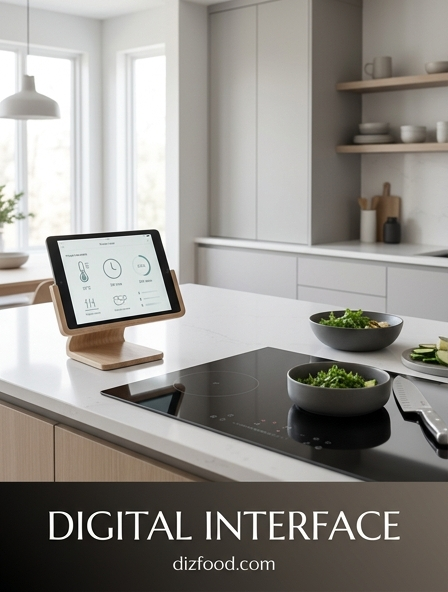
Precision Speed Control through Digital Inputs
The evolution of kitchen technology has transitioned from analog dials to sophisticated digital inputs, offering a level of control previously reserved for commercial laboratories. Digital speed control allows users to adjust motor intensity with extreme granularity, often in increments of single percentage points. This precision is vital when working with delicate ingredients that require a gentle fold rather than a vigorous whip. By utilizing capacitive touch sliders or digital buttons, chefs can transition smoothly between speeds without the mechanical jarring typical of traditional switches.
- Variable speed ranges from 1 to 100 for micro-adjustments.
- Soft-start technology to prevent ingredient splatter.
- Constant torque monitoring to maintain speed under heavy loads.
- Digital synchronization for multi-stage blending processes.
Modern interfaces provide a tactile yet electronic response, ensuring that the user is always in command of the appliance's power. This digital precision eliminates the variance found in manual knobs, which can wear down or lose calibration over time. Consequently, recipes that demand specific RPM counts for emulsification or aeration are now easily repeatable in a home setting, bridging the gap between amateur cooking and professional culinary arts through superior interface design.
Mastering Texture with Programmable Timers
Timing is perhaps the most critical variable in achieving the perfect culinary texture. Digital interfaces now feature integrated programmable timers that allow users to set specific durations for their kitchen tasks. Whether it is kneading dough or milling grains, the ability to walk away from an appliance knowing it will stop exactly when the desired consistency is reached is a significant luxury. These timers prevent the common pitfall of over-processing, which can turn a vibrant pesto into a dull paste or over-work a delicate batter into something tough and unpalatable.
- Select the desired function on the digital console.
- Input the exact duration required for the specific ingredient.
- Monitor the countdown display for real-time progress updates.
- Utilize the auto-shutoff feature to ensure consistency across batches.
The integration of countdown and count-up timers provides a dual benefit: it assists in following strict recipes while also helping users develop their own custom durations for unique creations. High-contrast digital displays ensure these timers are visible from across the kitchen, allowing for efficient multi-tasking during complex meal preparations. By mastering time via digital input, the chef gains absolute control over the structural integrity of their food.
Intuitive Touchscreen Navigation for Culinary Precision
The modern kitchen is increasingly defined by intuitive touchscreen interfaces that mimic the ease of use found in smartphones. These high-resolution panels replace cluttered physical buttons with a streamlined, hygienic surface that is easy to clean. Navigating through complex menus becomes a matter of simple swipes and taps, allowing chefs to access deep-level settings such as temperature adjustments, motor speeds, and recipe libraries without consulting a manual. The visual nature of these interfaces reduces the learning curve for advanced appliances.
| Feature | Benefit |
|---|---|
| Icon-Based Menu | Quick recognition of functions at a glance. |
| Gesture Control | Allows operation with minimal physical contact. |
| Multi-Language Support | Accessibility for a global range of users. |
Furthermore, these screens are engineered to withstand the harsh environment of a kitchen, including exposure to steam, heat, and moisture. The glass surfaces are often treated with oleophobic coatings to resist fingerprints and grease, ensuring the display remains clear during intense cooking sessions. By centralizing all controls into a single, responsive hub, the digital interface transforms a complex piece of machinery into a user-friendly partner in the culinary process.
Real Time Feedback on High Definition Displays
High-definition displays in the kitchen provide more than just aesthetic appeal; they offer critical real-time feedback that informs the cooking process. As an appliance operates, the screen can display a wealth of data including current blade speed, internal temperature of the ingredients, and the elapsed time of the current cycle. This transparency allows the user to make informed decisions on the fly. For instance, if a digital display indicates that a soup has reached the ideal simmering temperature, the user can immediately pivot to the next step without manual testing.
The clarity of OLED and LCD screens ensures that information is legible even under bright kitchen lighting or from extreme angles. Many interfaces use color-coded alerts-such as a red glow for high heat or a blue pulse for cooling-to communicate status quickly and effectively. This visual communication reduces the cognitive load on the chef, as they no longer need to interpret mechanical sounds or vibration patterns. Instead, the appliance provides a clear, data-driven narrative of the culinary task at hand, ensuring that every variable is monitored and managed with professional-grade accuracy.
Fine Tuning Power with Incremental Pulse Settings
The pulse function is an essential tool for achieving specific textures, such as chunky salsas or coarsely chopped nuts. In a digital interface, the pulse setting is elevated through incremental control, allowing the user to dictate the exact duration and intensity of each burst of power. Unlike traditional pulse buttons that offer a binary on/off state, digital pulses can be programmed for specific intervals, such as a half-second burst at 40% power. This level of granularity prevents the accidental liquefaction of ingredients.
- Manual pulse for quick, user-controlled bursts.
- Short-burst pulse for delicate chopping of herbs.
- Long-burst pulse for breaking down fibrous vegetables.
- Rhythmic pulse patterns for consistent dough aeration.
This precision is particularly useful when finishing a blend. A few carefully controlled digital pulses can incorporate air or adjust the final texture without altering the overall temperature of the food. The responsiveness of the digital interface ensures there is no "lag" between the press of a finger and the activation of the motor, providing the split-second timing necessary for artisanal food preparation. This marriage of power and restraint is the hallmark of a high-end digital kitchen interface.
Eliminating Guesswork Using Smart Preset Modes
Smart preset modes are the pinnacle of convenience in the digital kitchen, utilizing pre-programmed algorithms to handle complex tasks. These modes are designed by culinary experts to optimize speed, time, and power for specific results. For example, a "Smoothie" preset may start with a series of slow pulses to crush ice, followed by a high-speed ramp-up to emulsify frozen fruits, and finally a slow-down period to remove air bubbles. This automation ensures that even a novice can achieve professional results with a single touch.
- Identify the primary ingredient type (e.g., Soup, Puree, Ice).
- Select the corresponding preset icon on the digital interface.
- Allow the smart logic to adjust motor RPM and duration automatically.
- Wait for the completion signal before serving.
Beyond simple blending, presets can include cleaning cycles, vacuum-sealing durations, or precise heating curves for sous-vide cooking. By removing the need for manual calculation, these modes eliminate the risk of human error. They provide a reliable baseline for every kitchen task, ensuring that the output remains consistent regardless of who is operating the machine. The digital interface thus acts as a repository of culinary knowledge, accessible at the press of a button.
Responsive Interface Design for Perfect Results
The effectiveness of a kitchen interface is measured by its responsiveness. In a high-stakes cooking environment, any delay or failure in touch registration can lead to ruined ingredients or safety hazards. Advanced digital interfaces utilize high-frequency capacitive sensors that can detect a touch even if the user's hands are slightly damp or covered in flour. This reliability is coupled with haptic or auditory feedback-subtle vibrations or chimes-that confirm a command has been received. This feedback loop is essential for building user confidence in the machine's operation.
Designers also focus on the "architecture of information," ensuring that the most commonly used buttons are the most accessible. Ergonomics play a vital role, with screens tilted at angles that prevent neck strain and minimize glare from overhead lights. The aesthetic of the interface often complements the hardware, using minimalist layouts and high-contrast typography to ensure readability at a glance. When an interface is truly responsive, it disappears into the workflow, allowing the chef to focus entirely on the creative aspects of the meal while the digital system handles the technical execution with flawless precision.
Customizing Blend Cycles via Digital Programming
For the advanced user, the ability to customize blend cycles is a transformative feature. Digital programming allows chefs to create their own "recipes" for the machine itself, dictating exactly how the motor should behave over a set period. This might involve a custom ramp-up from speed 3 to speed 9 over twenty seconds, followed by a specific pulse pattern. These customized cycles can then be saved to the machine's internal memory, creating a personalized library of textures and techniques that are unique to the user's kitchen style.
| Stage | Speed Setting | Duration |
|---|---|---|
| Initial Break | Level 4 | 10 Seconds |
| High Emulsify | Level 10 | 45 Seconds |
| Texture Finish | Pulse Mode | 5 Bursts |
This level of customization is particularly beneficial for commercial settings or for home cooks who have perfected a specific signature dish. By programming the sequence into the digital interface, the user ensures that the "secret sauce" is recreated perfectly every single time. It turns the appliance into a programmable robot, capable of executing complex instructions that would be impossible to manage manually with the same degree of accuracy and repeatability.
Achieving Consistency with One Touch Memory Settings
In a busy kitchen, efficiency is paramount. One-touch memory settings allow users to store their most frequent operations for immediate access. Instead of navigating through multiple menus to find a specific speed and time combination, the user can assign these parameters to a dedicated "Favorite" button. This functionality is a boon for daily routines, such as morning protein shakes or consistent vegetable prep, where the requirements rarely change. The digital interface stores these variables in non-volatile memory, ensuring they are preserved even after the power is disconnected.
- Store up to five custom user profiles.
- Instant recall of the last used settings.
- One-touch activation for routine maintenance cycles.
- Quick-save feature for successful experimental blends.
The psychological benefit of these settings is significant; they reduce the friction of starting a task. When the interface remembers your preferences, the machine feels like a personalized tool rather than a generic appliance. This consistency is the key to mastering the kitchen, as it allows the cook to rely on the equipment for the repetitive, technical aspects of food preparation, freeing up mental energy for seasoning and presentation.
Advanced Sensor Integration for Automated Accuracy
The most sophisticated digital interfaces do not just receive input; they actively gather data through integrated sensors. These sensors monitor internal conditions and adjust the appliance's behavior automatically to ensure accuracy and safety. For example, a load sensor can detect the resistance of the ingredients and increase power to maintain a constant RPM, while a thermal sensor can trigger a cooling cycle or shut down the motor if it detects overheating. This automated oversight happens in the background, mediated by the digital control board.
- Sensors detect the volume and density of the container contents.
- Data is transmitted to the digital processor in milliseconds.
- The interface adjusts the power output to match the detected load.
- Safety protocols are engaged if parameters exceed safe limits.
Lid sensors and container-detection technology also play a vital role, preventing the interface from activating the motor unless the appliance is safely assembled. This integration of hardware sensors and digital logic creates a "smart" environment where the machine protects itself and the user. By combining sensory data with digital precision, the kitchen interface ensures that every task is performed with the highest possible level of automated accuracy and safety.

Comments